Departures Report
The Departures report allows users to view the list of guests departing from the property for the selected date.
Perform the following steps to generate the report:
Navigate to Reports ➜ Dynamic Reports ➜ Front Desk ➜ Departures report
Refer to the following table and fill in the fields.
|
Field |
Description |
|---|---|
|
Report Name |
Departures. |
|
Property |
This is a mandatory multi-select drop-down list that allows users to select the properties for report generation. The current property is selected by default. |
|
Start Date |
This is a mandatory field that allows users to select the start date for report generation. The current property date is selected by default. Users can select past or future dates. |
|
End Date |
This is a mandatory field that allows users to select the end date for report generation. The current property date is selected by default. Users can select past or future dates. |
|
Exclude Departures |
This is an optional multi-select drop-down list that displays the following options:
|
|
Rate Plan/Package Code |
This is an optional multi-select drop-down list that allows users to select the active rate plans and packages available at the property. |
Click Run to generate the report.
Click Save to save the report under User Favorites section.
Sample Report
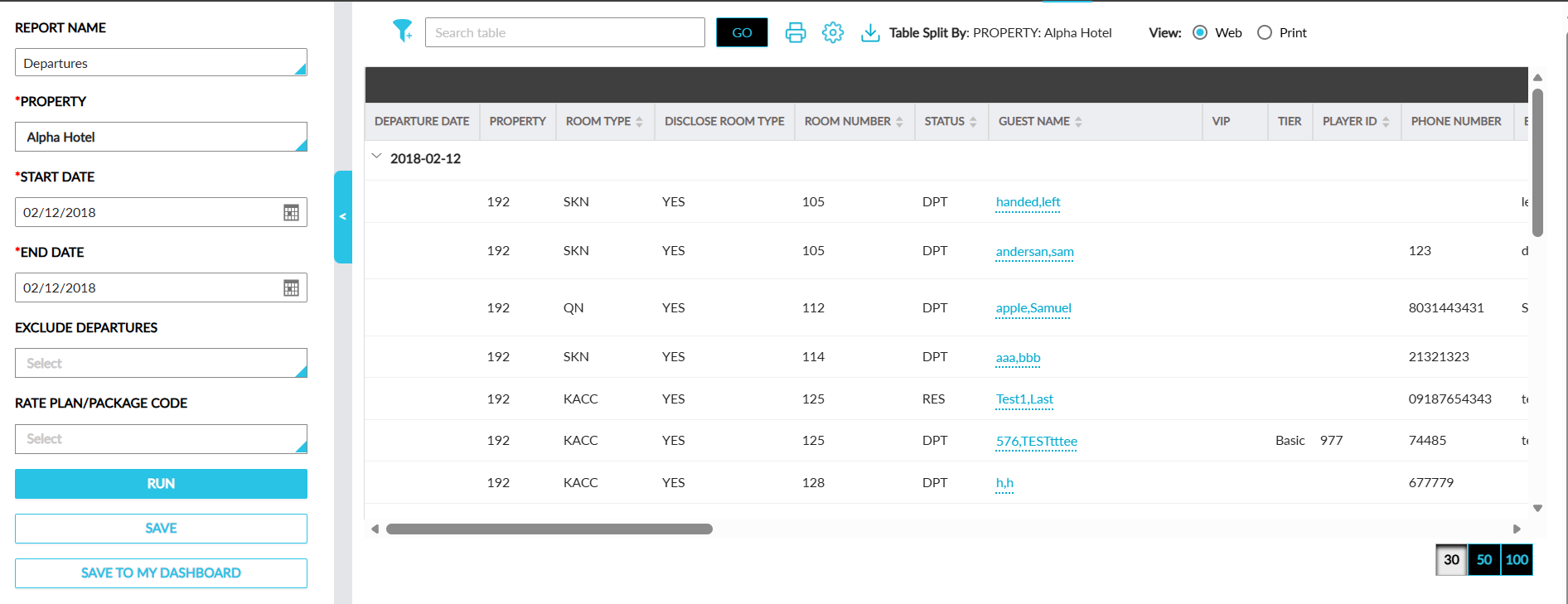
Report Fields
This report displays the following fields:
|
Field |
Description |
|---|---|
|
Departure Date |
The departure date of the reservation. |
|
Property |
The property in which the reservation was booked. |
|
Room Type |
The room type of the reservation. |
|
Disclose Room Type |
Displays Yes when the Do not disclose room type to guest flag is disabled and displays No when the flag is enabled. |
|
Room Number |
The room number assigned to the reservation. |
|
Status |
The status of the reservation. |
|
Guest Name |
The guest name associated with the reservation. |
|
VIP |
The VIP status of the guest. |
|
Tier |
The loyalty tier of the guest. |
|
Player ID |
The patron ID of the guest. |
|
Phone Number |
The phone number configured in the guest profile. |
|
|
The email address configured in the guest profile. |
|
Arrival Date |
The arrival date of the reservation. |
|
Late CO |
The late checkout time of the reservation. |
|
ETD |
The estimated time of departure of the guest. |
|
Nights |
The number of stay nights of the reservation. |
|
Guests # |
The number of guests associated with the reservation. |
|
Market Segment |
The market segment associated with the reservation. |
|
Group Name |
The group name associated with the reservation. |
|
Company Name |
The company name associated with the reservation. |
|
Docs |
The count of documents attached to the reservation. |
|
Non Registered Guest |
Indicates whether the guest associated with the reservation is a Non-Registered Guest. |
|
Confirmation |
The confirmation ID of the reservation. |
|
Third-Party Confirmation |
The third-party confirmation ID of the reservation. |
|
Reservation Alias |
The alias name for the reservation. |
|
Title |
The title associated with the guest. |
|
First Name |
The first name of the guest. |
|
Last Name |
The last name of the guest. |
|
Adults |
The count of adults associated with the reservation. |
|
Children |
The count of children associated with the reservation. |
|
Address |
The primary address of the guest profile. |
|
State/Province |
The state/province configured in the guest profile. |
|
Country/Region |
The country/region configured in the guest profile. |
|
Pets |
The count of pets added to the reservation. |
|
Guest Type |
The guest type associated with the reservation. |
|
Loyalty Number |
The loyalty member ID of the guest. |
|
Day Use |
Indicates whether the reservation is a day use reservation or not. |
|
Digital |
Indicates whether the reservation was checked out digitally. |
|
Rate Plan |
The rate plan used for booking the reservation. |
|
Base Rate |
The base rate of the associated rate plan. |
|
Average Room Rate |
The average nightly room rate of the reservation. |